
Secure Offline Finance Manager for Personal Budgeting
Overview
CMoney (BETA) is a personal finance management tool designed to help users track their financial activities without relying on cloud services. The software operates entirely offline, prioritizing user privacy by avoiding the storage of sensitive transaction data in remote servers. It enables users to monitor bank account balances, create customized budgets, and log daily expenses, making it suitable for individuals seeking full control over their financial data.
Target users include privacy-conscious consumers, budget-focused individuals, and professionals managing personal finances without external dependencies. The application supports core financial workflows such as account management, transaction recording, and budget planning. Real-world usage scenarios include monthly expense tracking, bill scheduling, and financial goal setting—all conducted locally on the user’s device.
The developer has not provided additional background information beyond the software’s purpose. As a beta release, CMoney is still under active development, with regular updates addressing UI refinements, bug fixes, and functional improvements. Users are encouraged to provide feedback and report issues directly to the developer via email.
Key Features & Capabilities
- Offline-Only Operation – All data remains stored locally, eliminating cloud dependency and reducing exposure to online security risks. Ideal for users who prioritize data privacy.
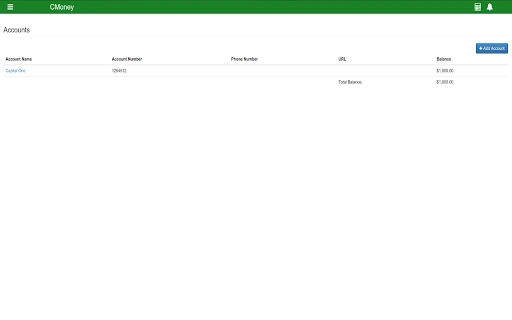
- Bank Account Tracking – Users can add and manage multiple bank accounts, view real-time balances, and monitor account activity directly within the application.
- Budget Creation and Monitoring – Flexible budgeting tools allow users to set monthly or custom-period budgets and receive alerts when limits are approached.
- Expense and Transaction Logging – Detailed entry of transactions with categories, dates, and notes helps users maintain accurate financial records.
- Bill Scheduling – The built-in scheduler helps users plan recurring payments and receive reminders, reducing the risk of missed bills.
- JSON Data Export – Users can export their full financial dataset as a JSON object, enabling backup, migration, or integration with other tools.
- UI and Functional Updates – Recent releases have improved visual design, updated icons, enhanced navigation, and optimized balance calculations for better accuracy.
These features collectively support a streamlined financial management workflow. For example, a user can set up a monthly budget, log daily purchases, and use the bill scheduler to avoid late fees—all without internet access. The ability to export data in JSON format also supports transparency and long-term data ownership.
User Interface, Workflow & Performance
CMoney features a clean, intuitive interface with tab-based navigation, allowing users to switch between accounts, transactions, budgets, and settings with minimal effort. The UI has been updated in recent versions to improve visual appeal and consistency across screens. Navigation is straightforward, with clearly labeled menus and a logical layout that reduces the learning curve.
Workflow efficiency is enhanced through direct access to core functions. Adding transactions, editing accounts, and reviewing budgets can be completed in a few clicks. The application’s responsiveness appears consistent with standard desktop software behavior, though exact performance metrics were not specified by the developer.
Stability has improved with recent updates, particularly in handling multiple accounts and balance calculations. The developer has addressed issues related to index misalignment after account deletion and fixed bugs in the bill reminder system. However, as a beta product, users should expect occasional instability or unanticipated behavior.
The developer did not specify resource usage details. Performance observations are based on general software behavior patterns. Users running older systems may experience variable performance depending on hardware configuration.
Compatibility & System Requirements
CMoney is available for both Windows and Mac operating systems, supporting a broad range of desktop users. The software has a file size of 100MB, which suggests a lightweight installation with minimal disk footprint.
Exact system requirements were not listed. The developer did not provide information on minimum CPU, RAM, or storage specifications. Compatibility with older OS versions or low-end hardware is unknown. Users should verify functionality on their specific setup, especially if using legacy systems.
Installation is straightforward, with no mention of complex prerequisites or third-party dependencies. The application runs as a standalone desktop program without requiring online authentication or background services.
Pros and Cons
Pros
- Completely offline operation ensures data privacy and security.
- Supports multiple bank account management with accurate balance tracking.
- Flexible budgeting and bill scheduling tools enhance financial planning.
- JSON export allows full data ownership and portability.
- Regular updates and active development show commitment to improvement.
- Free to use with no hidden costs or subscriptions.
Cons
- Limited to JSON export format—no support for CSV or Excel.
- No cloud sync or cross-device access due to offline-only design.
- Development is still in beta; some features may be unstable.
- Missing detailed system requirements may hinder compatibility assessment.
- Limited user support channels beyond email reporting.
FAQ Section
Is CMoney available for both Windows and Mac?
Yes, CMoney is compatible with both Windows and Mac operating systems.
Can I use CMoney without an internet connection?
Yes, CMoney is designed to operate entirely offline. All data is stored locally on your device.
Is the software secure?
Yes, since all financial data is stored locally and no information is sent to remote servers, the risk of data breaches is significantly reduced.
Does CMoney support automatic updates?
While the software is updated regularly, the current release does not specify whether updates are automatic or require manual installation.
Can I export my financial data?
Yes, users can export their complete dataset as a JSON object, which can be used for backup or integration with other tools.
Final Thoughts + CTA
CMoney (BETA) offers a compelling solution for individuals who value privacy and control over their financial data. Its offline-first approach, combined with essential budgeting and tracking features, makes it a strong contender in the personal finance software space. While still in development, the application demonstrates consistent progress through regular updates and responsive issue resolution.
It is particularly well-suited for users who prefer not to entrust their financial records to third-party cloud services. The free pricing model further enhances its accessibility. However, the lack of export formats beyond JSON and the absence of cross-device sync may limit broader appeal.
For those seeking a secure, private, and functional desktop finance tool, CMoney delivers a solid foundation. With continued refinement, it has the potential to become a trusted personal finance companion.
Download CMoney now







